How-to: Solve Queens on LinkedIn
Solve Queens on LinkedIn with easy strategies. Learn placement rules, elimination tricks, and pro tips to beat daily puzzles fast.
Listen up, Queens is basically one of those logic puzzles LinkedIn threw at us, and honestly, once you get the hang of it, you’ll be crushing it in under a minute. The whole point is placing crown symbols (Queens) on a colored grid without them touching each other – sounds simple but it’ll mess with your brain a bit. Let me break down everything you need to know to dominate this game.
What’s the Deal with Queens?
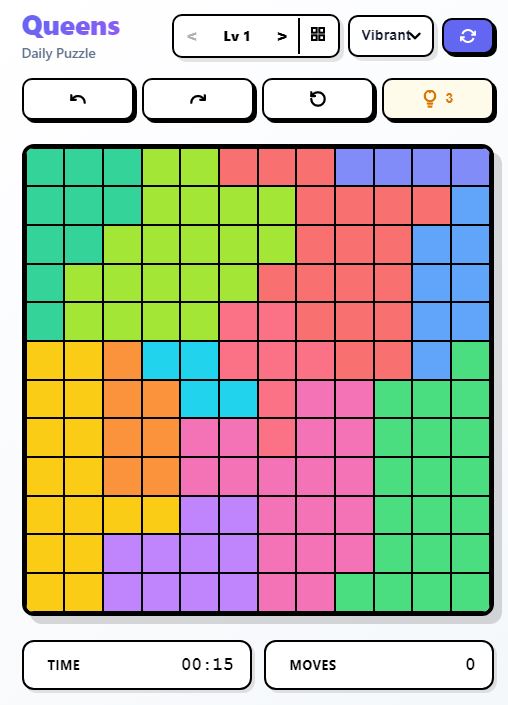
So here’s the basic setup – you got a colored grid, and your job is to place exactly one Queen (that little crown symbol 👑) in every row, every column, and every colored region. The catch? Queens can’t touch each other at all, not even diagonally. That’s like the golden rule you cant break.
Think of it like Sudoku met chess and had a baby. Each puzzle has only one correct solution, so theres no guessing involved technically (though sometimes you gotta take educated guesses when your stuck). The grid comes in different sizes but usually its around 7×7 to 10×10 squares with different colored regions scattered all over.
The Core Rules You Gotta Remember
One Queen per row – Each horizontal line needs exactly one crown, no more, no less.
One Queen per column – Same deal with vertical lines, just one Queen allowed.
One Queen per colored region – Every color block needs its own Queen sitting somewhere inside it.
No touching allowed – Queens cant be next to each other in any direction, including diagonal. If two Queens are diagonal neighbors, thats a fail.
Getting Started: First Moves
When you first open the puzzle, dont just start randomly placing Queens. Take like 10 seconds to scan the whole board. Look for colored regions that are super small or shaped weird – these are your goldmines.
Find the easy regions first – If theres a region thats only 1 or 2 squares, you already know where the Queen goes or at least can eliminate squares real quick.
Look for row/column intersections – Sometimes a colored region only touches one specific row and one specific column. Boom, thats where your Queen goes automatically.
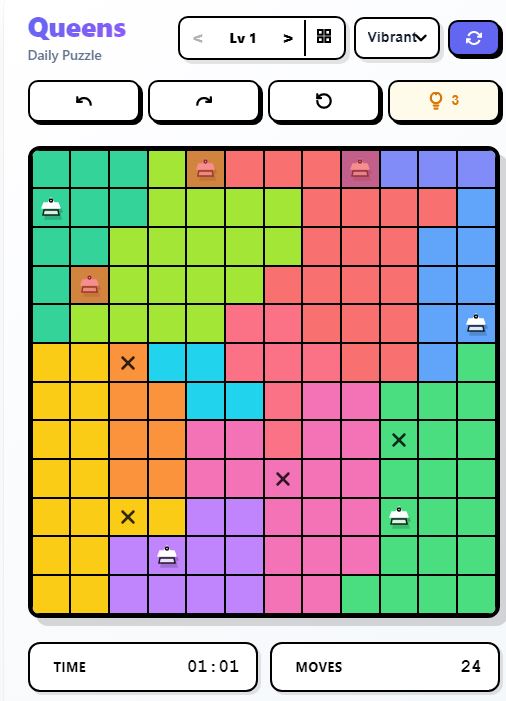
Use the X marker – The game lets you mark squares with an X to show where Queens CANT go. This is super helpful and you should be doing this constantly. Some people skip it but trust me, marking X’s saves you from making dumb mistakes later.
Pro Strategies That Actually Work
Alright, heres where we get into the good stuff that’ll make you faster.
Turn on Auto-X in settings – Go to the little settings gear and enable “Autoplay X”. This automatically marks all the squares around a Queen once you place it, which saves you tons of time. Its literally a game changer and most people dont even know about it.
Elimination technique – If you see two colored regions that can only fit in the same two columns (or rows), you can eliminate all other colors from those columns. This opens up a bunch of moves.
The touching cells trick – When cells of the same color are touching each other in the same row or column, you can eliminate other cells of that color cause the Queen has to be in one of those touching spots.
Count the regions vs rows/columns – If three columns only have three colored regions spread across them, then those three regions MUST have their Queens in those three columns. Everything else in those regions outside those columns? Mark em with X.
Start with constraints – Always look for rows, columns, or regions that have the most restrictions. These usually unlock other parts of the puzzle.
Advanced Moves for Speed Running
Once your comfortable with basics, try these to get your time down.
Minimal placement strategy – Instead of marking every X, try to find the 1-2 key Queen placements that make the puzzle solve itself. The game auto-fills a lot once you nail certain critical positions.
Look for blocking scenarios – Sometimes placing a Queen in a specific square would block an entire region from having any valid placement. That means the Queen CANT go there, so mark it.
Region allocation trick – If a region spans multiple rows, figure out which rows are “allocated” to that region based on other constraints. This helps eliminate impossible squares.
Process of elimination guessing – If your really stuck, pick the region with the fewest possible squares (like only 2-3 options) and try one. If it creates an impossible situation where another region has no valid squares, backtrack and X out your guess.
Common Mistakes Everyone Makes
Not using the X marker enough – Seriously, mark those impossible squares. It makes everything clearer.
Forgetting diagonal rules – Queens cant touch diagonally. I see people mess this up all the time and then wonder why their solution dont work.
Ignoring colored regions – You can get so focused on rows and columns that you forget each color needs exactly one Queen too.
Rushing the start – Take a few seconds to analyze before placing anything. The fastest solvers spend time planning their first moves.
Game Features You Should Know
After you finish the puzzle, LinkedIn shows you a results page with your time compared to averages – like all members, your company, CEOs, whatever. Theres also streak tracking if your into that competitive stuff, and you can share your score to flex on your connections.
You can use the Hint button if your stuck (it highlights a region where a Queen must go or shows incorrect placements), and theres an Undo button to take back your last move. If you totally screw up, hit Clear to start fresh.
Why People Love This Game
Queens is weirdly addictive because every puzzle feels different. The colored regions create unique constraints every day, so you cant just memorize patterns. Plus its quick – most puzzles take 1-5 minutes depending on difficulty, so you can knock it out during a coffee break.
LinkedIn drops new puzzles daily, and they range from pretty easy on Mondays to brain-melting hard by the end of the week. The community aspect is cool too – people share their strategies in the comments and theres leaderboards for companies and schools.
Final Tips to Get Good Fast
Play daily – Like any puzzle game, consistency makes you way better. Your pattern recognition improves after doing like 20-30 puzzles.
Watch solution videos – LinkedIn and other players post walkthrough videos showing their solving process. You’ll pick up tricks you never thought of.
Join the discussion – Check out the daily post comments where people explain their strategies. Sometimes someone drops a technique that completely changes how you approach puzzles.
Dont stress about time at first – Focus on actually solving the puzzle correctly before worrying about speed. Time improvements come naturally once you got the strategies down.
Practice the settings – Make sure your settings are optimized (like that Auto-X feature). Little things make a big difference when your trying to beat the clock.
So yeah, thats pretty much everything you need to know to crush Queens on LinkedIn. Start with the basics, learn the elimination techniques, and dont forget to mark those X’s. You’ll be posting sub-30-second times before you know it.