So you’ve seen everyone posting their Queens scores on LinkedIn and wondering what all the fuss is about? Well, you’re in the right place because I’m gonna break down everything you need to know about this addictive puzzle game that’s got professionals hooked during their coffee breaks.
Queens is basically a logic puzzle where you gotta place crown symbols (👑) on a colored grid without breaking any rules. Think of it like a strategic chess problem but way more accessible and perfect for a quick mental workout.
The Basic Rules You Need to Know
Alright, lets get into the core rules first because once you understand these, everything else becomes pretty straightforward:
One Queen per row – Each horizontal line across the grid must have exactly one crown symbol, no more, no less.
One Queen per column – Same deal but vertically, each column gets exactly one queen.
One Queen per colored region – This is where it gets interesting because the grid is divided into different colored areas and each color zone needs exactly one queen.
No touching allowed – Here’s the tricky part that trips up most beginners, queens cannot touch each other at all, not even diagonally. This rule is what makes the puzzle challenging because you gotta think several moves ahead.
How to Actually Start Playing
Getting started is super easy, just head over to the LinkedIn games section and click on Queens. You’ll see a colored grid with empty cells just waiting for you to solve it.
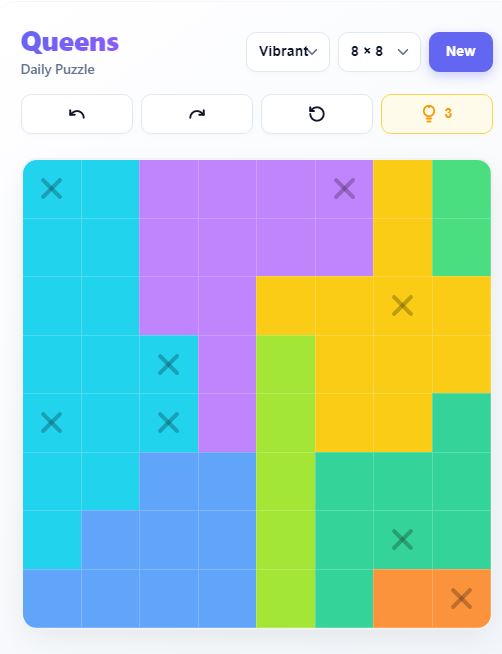
Click or tap on any cell to cycle through three states – empty cell, marked with an X, and crown symbol. The X marker is gonna be your best friend because it helps you eliminate cells where a queen definitely cannot go.
Strategy Tips That Actually Work
Now here’s where my experience comes in handy because I’ve solved hundreds of these puzzles and figured out some patterns:
Start with the obvious moves – Look for colored regions that have very limited options, like if theres a small 2-cell region, you can often figure out immediately where the queen must go based on adjacent queens.
Use the elimination method – Mark X’s in all the cells where a queen is impossible to place, this narrows down your options significantly. For example if you place a queen somewhere, immediately mark all 8 surrounding cells with X’s because queens cant touch.
Enable Auto-check in settings – This feature highlights rule violations with red stripes when you place too many crowns, super helpful for catching mistakes early.
Turn on Auto-place X’s – This automatically marks invalid cells based on your crown placements which saves you tons of time.
Look for “forced moves” where only one cell in a row, column, or color is still available. These are your guaranteed correct placements.
Advanced Techniques for Faster Solving
Once you’ve got the basics down, try thinking in patterns. When you see a bracket-shaped colored region with another color sitting in the middle, you can often eliminate cells because placing a queen there would make it impossible to place one in the surrounding color.
Count your queens as you go – if you’re playing on a 9×9 grid, you need exactly 9 queens total. Keeping track helps you know when you’re close to finishing.
Using the Helper Features
Stuck on a tough puzzle? LinkedIn Queens has got your back with some assistance tools:
Hint button – Click this to highlight a region where a crown must be placed or to show incorrect placements. Don’t feel bad about using it, even experienced players need hints sometimes on the harder grids.
Undo button – Made a mistake? Just tap undo to remove your last placement without starting over.
Clear button – If you wanna start completely fresh, this removes all your crown and marker symbols.
After You Complete the Puzzle
Once you’ve solved it, LinkedIn shows you some pretty cool stats. You’ll see your completion time compared to averages for all members, people at your company, CEOs, and other groups. Its actually kind of addictive trying to beat your own times or seeing how you stack up against others.
You can track your streak and game analytics in the streak module, plus set reminders so you dont miss when a new puzzle drops. There’s also leaderboards where you can see if your company or school is ranked and how they compare to others.
Common Mistakes to Avoid
The biggest mistake I see beginners make is forgetting about the diagonal rule. You might have your rows, columns, and colors all correct but if two queens are touching diagonally, the puzzle wont accept it.
Another common error is not using the X markers enough. I know it seems tedious at first but trust me, marking impossible cells makes the logical deductions so much clearer.
Don’t just randomly guess and place queens hoping it works out. The game is designed so that every puzzle can be solved using pure logic without any guessing.
Why People Love This Game
Queens has become super popular on LinkedIn because its the perfect length for a work break – most puzzles take between 2-5 minutes to solve. Plus theres something satisfying about the logical deduction process that makes your brain feel good.
The daily puzzle format keeps people coming back because you get a fresh challenge every single day. And the social aspect where you can share your scores and compete with colleagues adds an extra layer of fun.
Getting Better Over Time
Like anything else, you’ll get faster and better with practice. Start paying attention to patterns in how the colored regions are arranged because similar layouts often have similar solving approaches.
Some players have reported going from 5+ minute solve times down to under 2 minutes just by practicing daily and internalizing the common logical patterns. The key is to develop that muscle memory for spotting forced moves quickly.
Mobile vs Desktop Play
Good news – Queens works great on both mobile and desktop. The touch controls are optimized for smaller screens so you can easily play on your phone during commute or lunch break. Your progress syncs across devices too if you’re logged into LinkedIn.
Alternative Ways to Play
If you dont have a LinkedIn account or want to practice more than one puzzle per day, there are clone sites and apps that offer the same gameplay with unlimited puzzles. Some even have multiplayer modes where you can challenge friends directly.